

Over the last several years, Infographics have gained a lot of popularity.
Infographics are still a popular way to spread the word about your business and get a ton of social shares if done right.
That, in turn can lead to a multitude of benefits, notably:
- More visibility
- Branding
- SEO via backlinks
Infographics are getting more attention from businesses and organizations because they are good at getting information to the right people quickly and easily.
A website can really get a lot of new visitors if it has an infographic that is interesting and useful.
Do you want to learn more about how to use infographics in your marketing?
Find out how in this infographics for beginners guide.
What are Infographics?
An infographic is a set of images, graphical representations of data such as bar graphs and pie charts.
Or they have marginal text that provides an overview of a subject in an easy-to-understand format.
To put it more simply, they are pictures that bring a difficult, tedious, or detailed subject matter to life.
Infographics are an effective method of visual communication that are becoming increasingly popular.
Infographics that are visually distinctive, creative, and engaging tend to be the most successful ones because they capture our interest and don’t let go easily.
Here is one I made related to Infographics for beginners:

Tips For Successful Infographics
Anyone can make an infographic.
But you want to make sure you keep these points in mind so that you have a better chance of success.
Do your Keyword Research
You want the topic of your infographic to be about something that people are searching for.

The KW that you want to target should get some search volume, but make sure it is not something too hard to get traffic for.
Keep your message strong and original
It’s important to keep your main message strong and new.
For example, you can use different pictures or shapes instead of some words or letters to make your message stand out in the most creative way.
Don’t write too much
When a page is full of words, it can lose the attention of your readers.

So, make sure to keep your infographic simple and use as few words as possible.
But it’s important to give information that grabs your audience’s attention and gives them something interesting to think about.
Don’t forget to add sharing buttons
If you want your message to reach a wide range of people, you need to let people share the information with their friends through sharing buttons.

Also, make sure that the buttons you provide are simple and easy to use.
Infographics Walkthrough Video
As the video above showed, using templates makes the creation process much easier.
Otherwise, you’ll need to hire a graphic designer who is proficient in something like photoshop.
That’s an expense too and there is no guarantee any freelancer will make what you are looking for.
When it comes to infographics for beginners, try Canva pro and make your life easier.
Infographics for SEO:
Once you have downloaded your infographic, what next?
A good tip is to first add Exif data to your downloaded image.

What is this?
EXIF files, which stand for “Exchangeable Image File Format,” store important information about photos.
When you take a picture with almost any digital camera, these data files are made.
The information about the image itself is stored in the EXIF file.
But, as this can be lost with plugins that most sites use, you need to add it manually [and this helps with image seo in the long run as well].
You can do this for free here: https://www.thexifer.net/
Just follow these steps:
- Drag and drop your image into the upload box.
- Then click on ‘exifme’
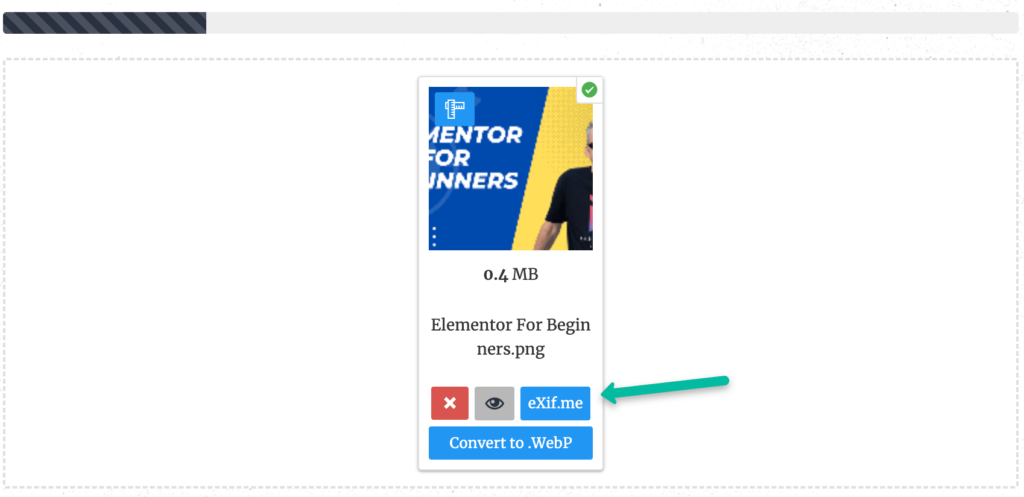
You will see a lot of options so focus on the sections in the image below:
Then, fill out the sections you can.
Use your name, website and KW where applicable.

When you feel you are done, click on the ‘go.exifing’ button as shown below.

Finally, download your new image/infographic.

If you want to ensure your new file size is not too large, then use this: https://tinypng.com/
How to Share Your Infographic
Now you have your infographic, you’ll want to do a new things.
Think of places you can share your infographic too.
Here are some options:
- Imgur
- We Heart it
- Dribble
- Behance
- Slideshare
- Daily infographic
- Infographic Bee
- Visual.ly
Sharing your infographic helps people find, share, and spread your work across the internet.

Also, submitting your infographic to these trusted sites to gets more traffic, good backlinks from sites with a high DA (domain authority), and social shares.
QR Code
Canva allows you to generate a QR code for your infographic.
Like this:

Share Direct to Social Media
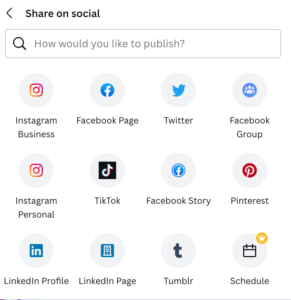
One option you have inside of Canva is directly sharing your infographic to various social media networks.
You’ll just need to connect them to your Canva account first.
Your Website
What’s more, you can also get an embed code and add it to your website.
This also means any links you add are clickable, which will not be the case with a .jpeg file.
Final Words
As this infographics for beginners post shows, you can easily make one inside of Canva that looks the part.
Then, you need to focus on sharing it.
That can happen naturally if your site gets traffic.
However, the more proactive you are in sharing it manually the better.
To end, here’s my infographic for beginners infographic embedded: